The Complete Guide to AI Tools in 2026: Categories, Use Cases & How to Choose
AI tools have moved from being experimental software to becoming practical parts of everyday work. People now use them to research topics, write and edit content, generate images and video, analyze information, write code, organize tasks, and support specialized workflows.
But there is a problem: the number of AI applications keeps growing, while the differences between them are not always obvious. Two tools may appear to do the same thing while being designed for very different users, workflows, limits, and budgets.
This complete guide explains the main categories of AI tools in 2026, what each category is useful for, how to choose the right tool, when a free plan is enough, and how to build a practical AI stack without collecting unnecessary subscriptions.
Table of Contents
Quick Answer: What Are the Best AI Tools in 2026?
There is no single AI tool that is best for every task. The right choice depends on what you are trying to accomplish.
- General AI assistants: useful for questions, brainstorming, writing, analysis, planning, and everyday tasks.
- AI writing tools: useful for drafting, rewriting, outlining, editing, and content workflows.
- AI image tools: useful for generating and modifying visual content.
- AI video tools: useful for video generation, editing, short-form content, and production workflows.
- AI research tools: useful for discovering, summarizing, comparing, and organizing information.
- AI productivity tools: useful for notes, documents, planning, automation, and repetitive work.
- AI coding tools: useful for generating, explaining, debugging, and improving code.
- AI marketing and creator tools: useful for content planning, optimization, audience workflows, and publishing.
For most users, a small combination of tools is more practical than dozens of overlapping subscriptions. Start with your most important task, find a tool that performs it well, and add specialized tools only when they solve a recurring problem.
What Are AI Tools in 2026?
AI tools are software applications that use artificial intelligence to perform or assist with tasks that traditionally required manual work or specialized software.
Depending on the product, an AI tool may generate text, summarize documents, answer questions, analyze information, create images, generate video, write code, process files, organize information, or automate parts of a workflow.
Modern AI applications are also becoming increasingly multimodal. Some products can work with text, images, documents, audio, video, or code within the same workflow.
This makes AI more flexible, but it also makes tool selection more complicated. A general-purpose assistant may be excellent for brainstorming while a specialized application may be better for video generation, YouTube optimization, image creation, or research.
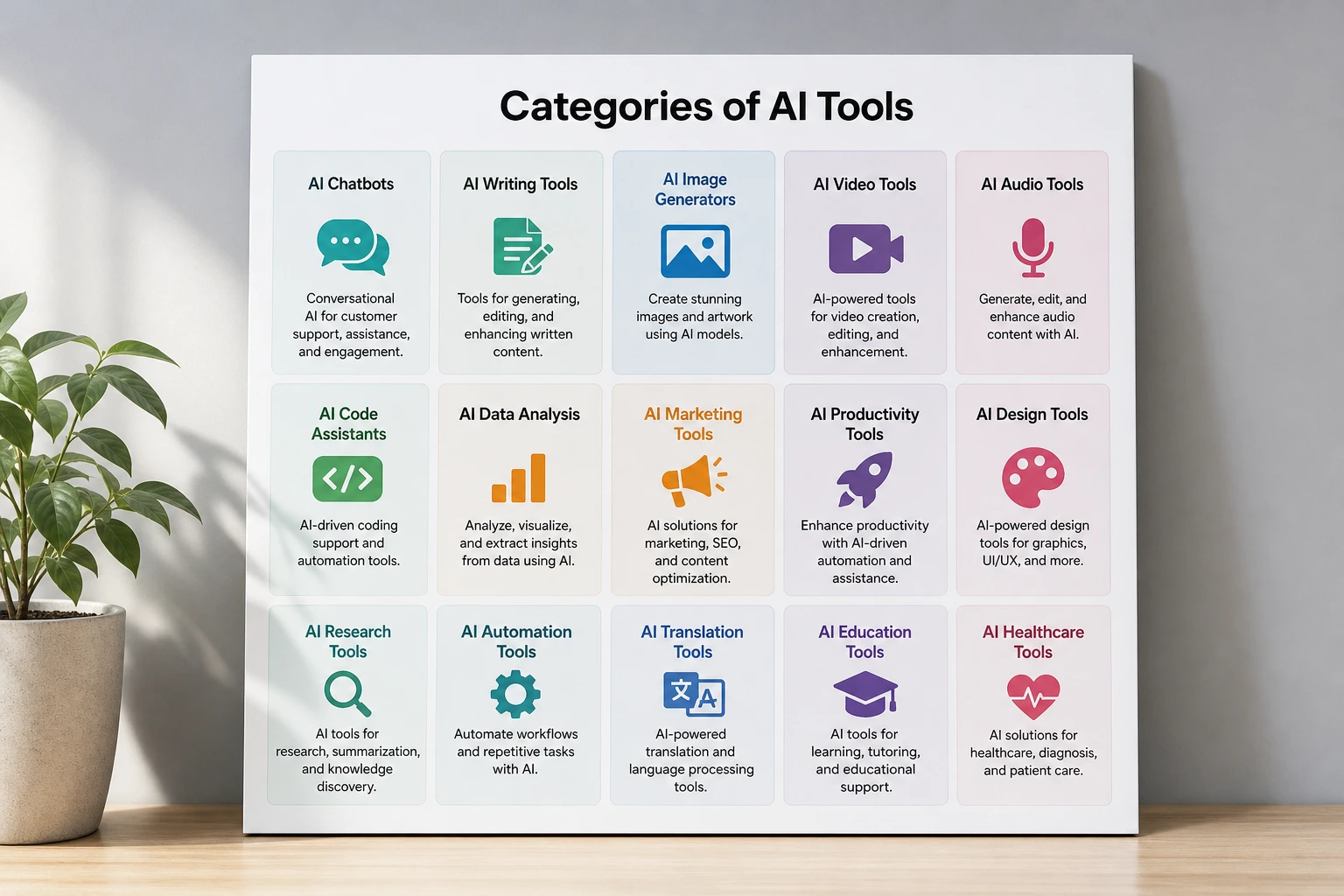
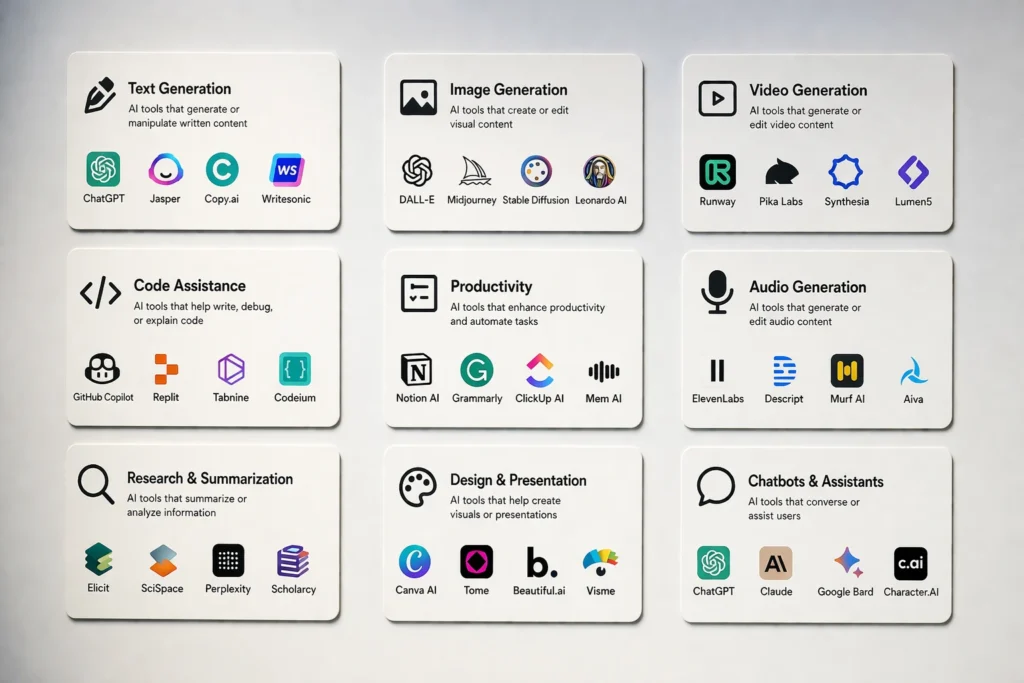
The Main Types of AI Tools
AI Assistants
AI assistants are general-purpose applications designed to help with a broad range of tasks. Common uses include answering questions, brainstorming, summarizing information, drafting text, analyzing documents, planning projects, and helping users reason through problems.
They are often a good starting point because one assistant can cover many everyday tasks before a user decides whether specialized applications are necessary.
The important factors include output quality, reasoning capabilities, available features, integrations, usage limits, and how well the assistant fits the user’s workflow.
AI Writing and Content Creation Tools
AI writing tools help users create, rewrite, summarize, organize, and edit written content. They can support blog posts, marketing copy, social media content, outlines, emails, product descriptions, and other forms of writing.
They are most useful when the user already understands the purpose and audience of the content. AI can accelerate drafting, but important facts, claims, tone, originality, and final accuracy still require human review.
For a focused comparison, see our guide to AI writing tools for content creators.
AI Image and Design Tools
AI image tools can generate new visuals from prompts or modify existing images. Depending on the product, they can support concept development, illustrations, marketing visuals, social media graphics, product concepts, and creative experimentation.
When comparing image tools, consider prompt control, image quality, editing capabilities, consistency, generation limits, commercial-use terms, and the type of visual work you actually need to produce.
For users specifically looking for free options, see our guide to the best free AI image generators.
AI Video Tools
AI video applications cover several different workflows. Some generate video from text or images, some assist with editing, while others focus on avatars, scripts, captions, or short-form production.
Because these products solve different problems, comparing them only by a general “best AI video generator” label can be misleading. Start by deciding whether you need generation, editing, repurposing, or a complete production workflow.
See our AI video generator guide for a more focused comparison. You can also explore our guides to free AI video generators and AI video tools for TikTok and Reels.
AI Research and Search Tools
AI research tools help users discover information, summarize sources, compare ideas, and organize research. Some are closely connected to web search, while others focus on documents, knowledge bases, or specialized research workflows.
For serious research, the quality of the sources matters as much as the generated answer. Users should check citations and verify important claims rather than treating every AI-generated response as authoritative.
Our Perplexity AI vs Google comparison explores the differences between AI-assisted search and traditional search.
AI Productivity Tools
AI productivity tools are designed to reduce repetitive work and help users organize information. Typical uses include meeting summaries, note organization, document processing, planning, task management, and workflow automation.
The best productivity tool is usually the one that removes a recurring bottleneck. A product with hundreds of features may provide less value than a simpler application that saves time every day on one important task.
AI Coding Tools
AI coding tools can assist with code generation, explanation, debugging, refactoring, documentation, and testing. They can be useful for experienced developers as well as people learning to code.
However, generated code should be reviewed and tested. The ability to produce code quickly does not remove the need to understand how that code works or whether it is appropriate for the project.
AI Marketing and Social Media Tools
AI marketing tools can support content ideas, copywriting, audience research, campaign planning, repurposing, and social media workflows.
Marketing teams should evaluate these tools based on whether they improve a measurable workflow rather than simply generating more content.
See our guide to the best AI tools for social media marketing for a more specific overview.
AI Creator and YouTube Tools
Creator-focused AI tools are designed around publishing workflows. Depending on the platform, they may help with topic research, keyword discovery, video ideas, optimization, scripts, thumbnails, or channel analysis.
For creators, specialization can be valuable because the workflow is different from general-purpose writing or research.
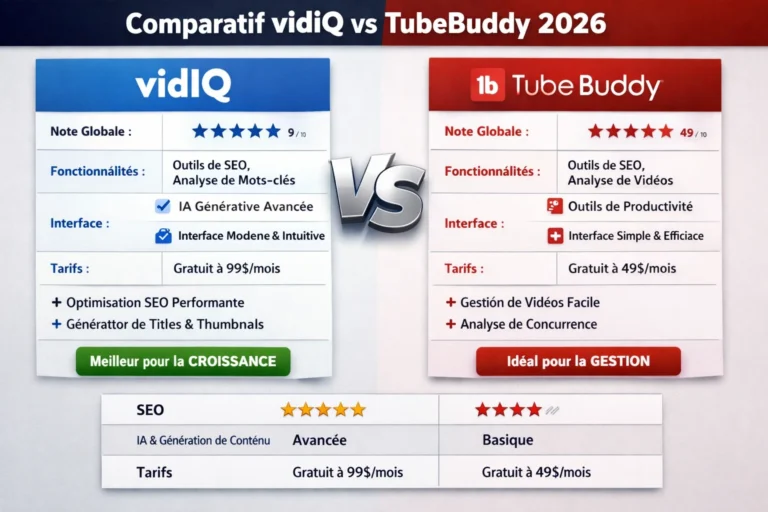
See our guide to AI tools for YouTube creators. We also have a practical guide to using VidIQ, plus dedicated resources covering VidIQ’s free-plan limitations, our VidIQ review, and the VidIQ vs TubeBuddy comparison.
Best AI Tools by Use Case
Choosing AI tools by use case is often more useful than choosing them by popularity. Start with the job you need to complete and then identify the category of software that can solve it.
For YouTube Creators
YouTube creators may need tools for topic research, keyword discovery, video planning, optimization, scripting, thumbnails, channel analysis, and content production.
A general AI assistant can help with brainstorming and scripts, while specialized creator tools can provide workflow-specific features.
Start with our AI tools for YouTube creators guide.
For Freelancers
Freelancers can use AI to support research, writing, proposals, administration, brainstorming, content creation, and repetitive tasks.
The best setup depends on the freelancer’s service. A writer may prioritize research and editing, while a designer may prioritize image generation and creative iteration.
See our guide to free AI tools for freelancers.
For Social Media Marketing
Social media workflows can involve research, content ideation, copywriting, image creation, video production, scheduling, repurposing, and analytics.
Rather than searching for one application that claims to handle everything, identify which part of the workflow consumes the most time and choose a tool for that bottleneck.
See our social media marketing AI tools guide.
For Content Creators
Content creators often need several stages: research, outlining, drafting, editing, visual creation, video production, and distribution.
AI can assist with each stage, but the workflow should remain centered on the creator’s goals, audience, and editorial judgment.
Our AI writing tools guide focuses on the writing side of this workflow.
For Students and Learning
Students can use AI for explanations, brainstorming, summarization, study questions, and organization. The most useful applications support learning rather than simply producing an answer to submit.
When using AI for education, verify important information and follow the academic rules that apply to the course or institution.
For Research and Information Discovery
Research-focused workflows benefit from tools that provide transparent sources and make it easier to investigate a topic. AI can speed up discovery and synthesis, but source verification remains essential for important decisions.
Our Perplexity vs Google comparison provides a more detailed look at two different approaches to search.
For Video Creation
Video creators should first decide whether they need text-to-video generation, editing assistance, avatars, captions, short-form production, or a broader production workflow.
Our AI video generator guide can help narrow the options.
Free vs. Paid AI Tools
Free AI tools can be surprisingly capable, but free access often comes with limits. These may include usage caps, slower access, fewer advanced features, limited generation credits, or restrictions on certain workflows.
A free plan is often appropriate when you are learning a tool, using it occasionally, or only need its basic capabilities.
A paid plan becomes more attractive when the tool is part of a frequent workflow and the additional capacity or features provide enough value to justify the cost.
When a Free Plan Is Enough
- You use the tool occasionally.
- You are testing whether it fits your workflow.
- You only need basic features.
- Your usage stays comfortably below the plan limits.
- You do not need advanced integrations or priority access.
When Paying May Make Sense
- The tool is part of your daily workflow.
- You repeatedly hit the free usage limits.
- You need features that are only available on paid plans.
- The tool replaces another service or saves meaningful time.
- You need higher capacity or more advanced workflow features.
Always check the current plan information before subscribing because AI products can change features, limits, and pricing over time.
How to Choose the Right AI Tool
1. Start With the Exact Task
Define the problem before comparing products. “I need AI” is too broad. “I need help researching sources for an article” or “I need to generate short-form video concepts” gives you a much better basis for comparison.
2. Compare Output Quality
Feature lists do not tell the whole story. Test the quality of the output for your specific task. A tool with fewer features may be the better choice if it produces better results for what you actually need.
3. Consider Ease of Use
A powerful tool that is difficult to learn or integrate may create more friction than value. Ease of use matters when the goal is to build a repeatable workflow.
4. Check Integrations
Integrations can be important when an AI tool needs to work with documents, websites, calendars, analytics, content platforms, storage systems, or other applications.
5. Review Privacy
Before uploading sensitive information, understand how the service handles user data and what privacy controls are available. Different AI applications may have different data policies.
6. Check Limits and Pricing
Look beyond the headline price. Check usage limits, credits, model access, file limits, generation restrictions, and other conditions that may affect the workflow.
7. Consider Whether You Already Own a Similar Tool
Before adding another subscription, check whether an existing application already provides the capability you need. Avoid paying for several tools that solve essentially the same problem.
How to Build an AI Tool Stack
An AI stack is simply a group of tools used together for a workflow. Building one does not mean subscribing to every category of AI software.
A practical stack can start with one general-purpose assistant and then add specialized applications only when they provide a clear advantage.
| Workflow | Typical AI assistance | What to evaluate |
|---|---|---|
| Research | Discovery, summaries, source organization | Sources, citations, coverage |
| Writing | Drafting, outlining, rewriting, editing | Quality, control, consistency |
| Design | Images, concepts, visual variations | Quality, control, editing |
| Video | Generation, editing, captions, repurposing | Output quality, limits, workflow |
| Productivity | Notes, documents, planning, automation | Integrations, reliability |
| Distribution | Optimization, publishing, repurposing | Platform support, workflow fit |
Keep the Stack Small
A smaller stack can be easier to manage, cheaper to maintain, and easier to learn. If two tools solve the same problem with similar results, there may be little reason to keep both.
Use Specialized Tools Where They Matter
Specialization is useful when a tool provides capabilities that a general assistant cannot easily replace. This is especially relevant for workflows such as YouTube optimization, image generation, video production, analytics, or specialized research.
Review the Stack Regularly
AI software changes quickly. New features can make an existing subscription more useful, while another service may become unnecessary. Periodically review which tools you actually use and whether they still justify their cost.
How to Evaluate an AI Tool Before Using It
Before committing to a new AI application, ask a short set of practical questions.
- What exact problem does it solve?
- How frequently do I have this problem?
- Is the output good enough for my use case?
- What are the free-plan limits?
- Which important features require payment?
- Does it integrate with my existing workflow?
- How does it handle sensitive information?
- Does it replace another tool or simply add another subscription?
- Can I evaluate it without making a long-term commitment?
These questions help distinguish genuinely useful software from tools that are interesting but unnecessary for your particular workflow.
AI Tools Comparison: A Practical Starting Point
The table below is designed as a starting framework rather than a claim that one application is universally superior.
| Category | Best for | Key strengths to look for | Main consideration |
|---|---|---|---|
| AI assistants | General tasks | Reasoning, writing, analysis | Output quality and limits |
| AI writing | Content creation | Drafting, editing, organization | Human review still matters |
| AI image | Visual creation | Generation, editing, control | Quality and usage limits |
| AI video | Video production | Generation, editing, repurposing | Workflow and generation limits |
| AI research | Information discovery | Search, synthesis, citations | Source verification |
| AI productivity | Organization and workflows | Automation, notes, documents | Integrations and reliability |
| AI coding | Software development | Generation, debugging, explanation | Review and testing |
| AI marketing | Marketing workflows | Ideas, copy, repurposing | Actual workflow impact |
| AI creator tools | YouTube and content creators | Optimization, research, publishing | Platform-specific value |
How Many AI Tools Do You Actually Need?
Most users do not need dozens of AI subscriptions.
A useful starting point is one general-purpose AI assistant plus a small number of specialized applications for tasks where specialization provides a meaningful advantage.
For example, a content creator may need a general assistant for brainstorming and research, a writing workflow, and a specialized video or creator tool. A freelancer may need fewer specialized applications if most of their work can be handled through one general assistant and existing software.
The correct number is therefore determined by workflow rather than by the number of AI products available in the market.
Common Mistakes When Choosing AI Tools
Choosing a Tool Because It Is Popular
Popularity does not guarantee that a tool fits your workflow. A widely discussed application may be unnecessary for your particular task.
Paying Before Testing the Workflow
If a useful free trial or free plan exists, test the actual workflow before committing to a subscription whenever practical.
Collecting Too Many Overlapping Tools
Having several applications that perform nearly identical tasks can increase cost and complexity without improving results.
Ignoring Limits
A tool may appear suitable until daily or monthly usage limits become a problem. Always consider how much you actually expect to use the product.
Trusting AI Output Without Verification
AI-generated content can contain mistakes, outdated information, or unsupported claims. Important information should be checked against appropriate sources.
Frequently Asked Questions
What are AI tools?
AI tools are software applications that use artificial intelligence to assist with tasks such as writing, research, analysis, image generation, video creation, coding, productivity, and automation.
What are the best AI tools in 2026?
There is no universal best AI tool. The right choice depends on the task, required features, output quality, budget, integrations, and privacy requirements.
Are AI tools free?
Many AI tools provide free plans or limited free access. However, advanced features, higher usage limits, or additional capabilities may require payment.
Which AI tools are best for beginners?
Beginners can usually start with an easy-to-use general AI assistant and add specialized applications only when a specific workflow requires them.
How do I choose an AI tool?
Start with the exact task you want to solve. Then compare output quality, ease of use, integrations, privacy, usage limits, and pricing.
Do I need multiple AI tools?
Not necessarily. One general-purpose tool may cover many everyday tasks. Additional tools are useful when they provide a clear advantage for a recurring workflow.
Are free AI tools good enough?
They can be. A free plan may be sufficient for occasional use or basic tasks. Frequent users may eventually need higher limits or advanced features.
How often should I review my AI tools?
AI products change frequently, so it is useful to review your stack periodically. Features, limits, pricing, and capabilities can change enough to make an old subscription less useful or a new tool more attractive.
Conclusion
The AI tools market is growing quickly, but choosing the right software does not require trying everything.
The most practical approach is to start with the task, identify the appropriate category, compare the tools that genuinely fit the workflow, and test the output before committing to a paid plan.
For more focused recommendations, explore TecDigi’s guides for YouTube creators, freelancers, social media marketing, AI writing, AI image generation, and AI video generation.
If you want to discover newer products and emerging capabilities, see our guide to new AI tools in 2026.
Affiliate disclosure: Some links on TecDigi may be affiliate links. If you purchase through one of these links, we may earn a commission at no additional cost to you.